Green Coffee Inventory Control For Roasters
Green Coffee Inventory Control For Roasters
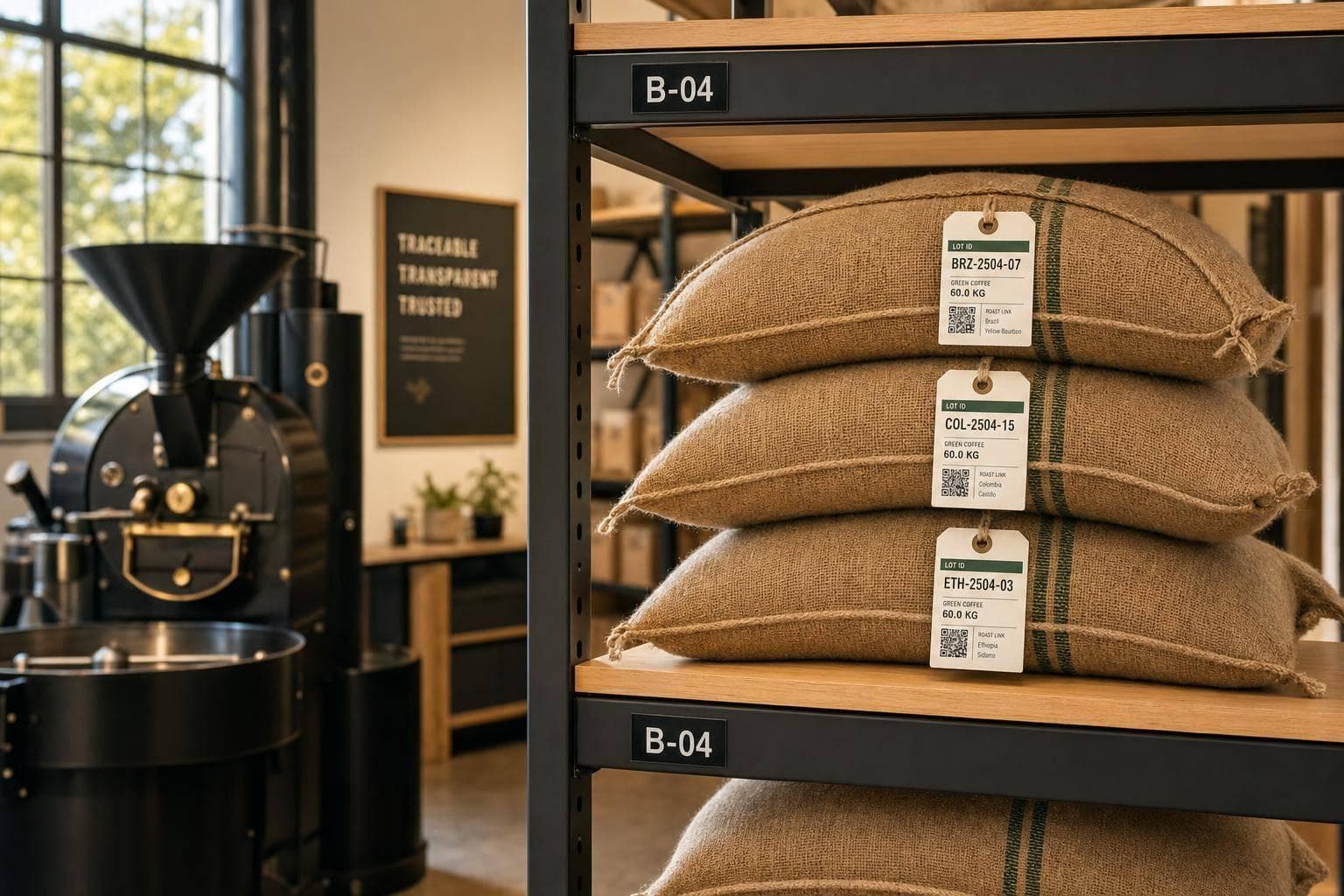
If I don’t track each green lot from delivery to roast batch, I lose margin, slow down tracebacks, and make stock errors. The fix is simple: I give every delivery its own lot record, track weight, cost, dates, storage spot, and status, then link each roast batch back to the lot used.
Here’s the short version:
- I record origin, supplier, supplier lot ID, and my own internal lot ID
- I log bag count, net weight in lb and kg, arrival date, harvest date, and landed cost
- I assign each lot a storage location and a clear status like Received, QC hold, Ready, or Reserved
- I match green lots to roast batches so I can trace finished coffee back to source
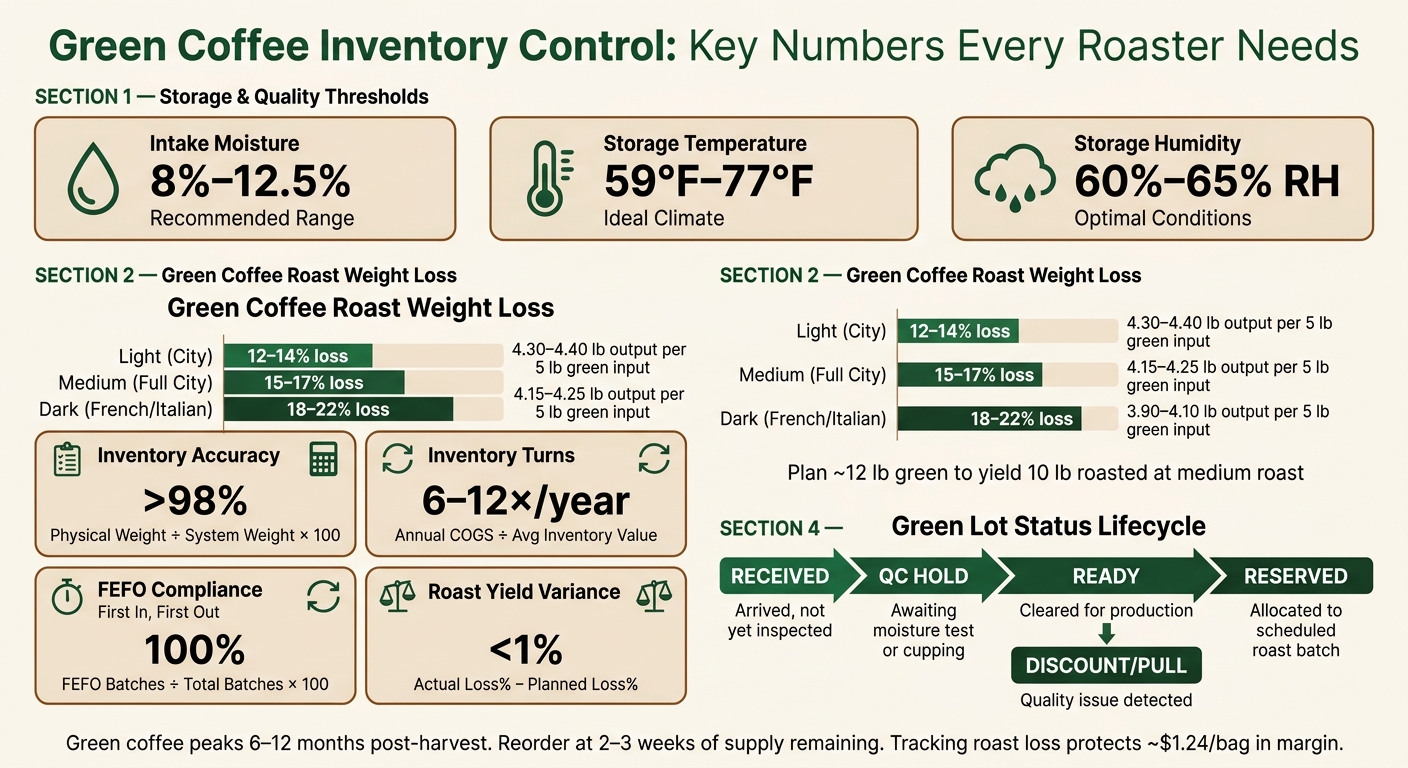
- I track roast loss, since green coffee usually loses 12% to 22% in the roaster
- I reorder based on weekly usage, lead time, safety stock, and lot age
- I check storage quality with moisture readings, cupping, and physical counts
A small roastery does not need a fancy system to do this well. I can start with a spreadsheet, printed labels, and a set count routine. What matters most is that the records match the bags on the floor.
A few numbers shape the whole process:
- Green coffee is usually best within 6 to 12 months after harvest
- Intake moisture should sit around 8% to 12.5%
- Storage should stay near 59°F to 77°F and 60% to 65% RH
- Inventory accuracy should stay above 98%
- Many roasters aim for 6 to 12 inventory turns per year
If I keep lot records clean and current, I protect quality, traceability, and profit per bag at the same time.
Green Coffee Inventory Control: Key Metrics & KPIs for Roasters
Roastery Management Using Cropster
1. Build a Lot Record for Each Green Coffee Delivery
Create one lot record for every green coffee delivery to help discover independent coffee roasters and manage their unique inventory needs. That single record is the backbone of storage, rotation, and traceability. If multiple deliveries get blended into one record, stock control gets messy fast and traceability gaps start to show.
This only works if staff can update records quickly and the same way every time.
Record Origin, Supplier, and Lot ID
For each delivery, record the full origin details: country, region, farm or co-op name, variety, and processing method, such as washed, natural, or wet-hulled. Then add the supplier name, supplier lot number, and invoice ID.
As soon as the delivery arrives, assign an internal lot ID, such as PG-0001, so you can tie that lot to roast batches later. That chain - origin → supplier lot → internal lot ID → roast batch - is what links finished bags back to a specific shipment during a USDA Organic audit.
"Green coffee batches are given distinct lot numbers as soon as they are received. This enables roasters to monitor the origin of the beans, purchase conditions, and storage processes." - Softengine
Track Bag Count, Weight, Dates, and Cost
Weigh every delivery yourself. Do not rely on bill of lading weight.
Record:
- Bag count
- Bag type
- Weight per bag
- Total net weight in lb and kg
- Arrival date in MM/DD/YYYY
- Harvest date
- Invoice date
Add the purchase price per lb and the landed cost, including freight, so each lot shows its true cost.
You should also record moisture content at intake. The target range is 8%–12.5%.
Assign Storage Location and Status
Each lot needs a clear storage location, like a bin number or warehouse zone, so staff can find it without hunting around. The record should also show the lot’s current status, so people know right away whether it can move into production.
Use a simple status scale:
| Status | Meaning |
|---|---|
| Received | Arrived, not yet inspected or cupped |
| QC hold | Awaiting moisture test or cupping approval |
| Ready | Cleared for production |
| Reserved | Allocated for a scheduled roast batch |
Use QC hold until the lot is approved. After inspection, update the status to Ready or Reserved.
Once each lot has a clear location and status, the system becomes much easier for staff to use.
2. Set Up a Tracking System Your Staff Will Actually Use
Next, make the system fast enough for daily use.
Start with a Spreadsheet or Inventory Software
Once each lot is recorded, the next job is simple: make those records easy to update.
For most small roasteries, a spreadsheet is the best place to start. Keep it lean with three tabs: Green Inventory, Roast Log, and Deliveries. Each tab has one clear purpose, so staff only update the sheet that matches the task in front of them.
| Tab | Key Fields |
|---|---|
| Green Inventory | Lot ID, Origin, Supplier, Cost/lb, Current Weight (lb), Location |
| Roast Log | Date (MM/DD/YYYY), Green Input (lb), Roasted Output (lb), Loss Rate, Lot ID Used |
| Deliveries | Arrival Date, Supplier, Lot ID, Bag Weight, Quantity, Total lbs Received |
At low volume, spreadsheets do the job well. But once roast activity picks up, they can get messy fast.
Digital records only help if bag labels and storage locations match those records exactly. If the sheet says one thing and the floor says another, you're flying blind.
Use Location Codes, Labels, and Count Routines
Every bag or bin in storage should have a printed label showing the lot ID, origin, supplier, and weight. Match that label to a short location code that lines up with your digital record exactly. Number storage spots in order and keep the pull order the same each time.
Physical counts are what keep digital records honest. A weekly or monthly count sheet, even if it's just paper on a clipboard, gives you a way to compare the system with what's sitting on the floor. Catch a mismatch early, and it's usually easy to fix. Find it during an audit, and it's a headache.
That kind of routine is what separates a manual system that works from one that starts falling apart.
Manual Tracking vs. Software Tracking: A Comparison
The best tool depends on how many lots and roast batches move through the business each week.
| Manual (Spreadsheet) | Software (SaaS/ERP) | |
|---|---|---|
| Fields tracked | Weight, origin, cost, and dates entered by hand | Same fields plus landed costs, moisture readings, and roast curves |
| Labor required | High; every roast and sale needs a manual update | Low; automated deductions after each roast log |
| Risk of error | High; typos and missed entries can create inflated margins | Low; real-time data and unique lot IDs reduce mistakes |
| Best fit | Very small roasteries or home roasters | Growing roasteries with wholesale or online sales |
As order volume grows, software can subtract roast usage on its own and keep lot traceability linked to invoices. That link matters because it ties each roast log back to a specific green lot.
sbb-itb-af00fa5
3. Store, Rotate, and Monitor Lot Quality
Once your lot records are set up, the next job is keeping them right in day-to-day storage and rotation.
Store Coffee by Lot with Clear Separation and Labels
Give each lot ID its own physical spot. Bags from different deliveries should stay apart, and every bin or pallet should show the matching location code and label. Keep bags on pallets, not directly on the floor, and leave enough space from the walls for airflow and easy sampling.
Store green coffee at 59°F–77°F and 60%–65% relative humidity. Green coffee takes in and gives off moisture from the air, so storage conditions matter a lot. For microlots, GrainPro or Ecotac liners can help extend shelf life past what standard jute allows.
If you carry organic-certified coffee, keep those lots physically separate from non-organic stock. That helps meet USDA rules and avoids cross-contamination.
Choose FIFO or FEFO Based on Age and Quality
Most warehouses use FIFO (First In, First Out). In plain English, that means you pull the oldest arrival first. For high-volume core blends, that often does the job.
But green coffee doesn’t age at the same pace across every lot. Some origins and processing methods fade sooner than others. That’s where FEFO (First Expired, First Out) comes in. Instead of rotating by arrival date alone, you rotate by which lot is closest to losing cup quality.
That call usually comes from a mix of factors:
- Arrival date
- Moisture readings
- Regular cupping
| Rotation Rule | Advantages | Risks | Common Use Cases |
|---|---|---|---|
| FIFO | Simple to track; prevents the oldest stock from being forgotten | Ignores that some lots age faster than others | High-volume core coffees and blends |
| FEFO | Preserves peak flavor by prioritizing lots showing early signs of fade | Requires regular cupping and moisture checks | High-scoring microlots and experimental processes |
Check Quality and Update Lot Status
A lot record isn’t something you set once and leave alone. Coffee changes in storage, and your records should change with it.
Spot cup each lot at least once a month. Watch for woody, papery, or cardboard-like flavors, which are common signs of age-related fade and lipid oxidation. You should also keep an eye on bean color. When green or blue-green beans start turning dull brownish-yellow, that’s another warning sign.
If a lot starts to fade, move it into blend use before brightness drops too far. If the quality issue is more serious, mark it as Discount/Pull so it doesn’t end up in a roast batch by accident.
Keep lot status current after every quality check. Using clear labels like Ready, Reserved, and Discount/Pull helps everyone on the floor know what can be pulled safely and what should feed into blend planning.
Use that quality status to guide both blend decisions and reorders. Many independent coffee roasters use these inventory protocols to maintain consistency across their seasonal offerings.
4. Connect Green Lots to Roast Batches and Reorders
Once lots are stored and rotated, the next move is simple: tie each roast to the right lot, deduct what you used, and let that data guide the next purchase.
Link Each Roast Batch to a Lot and Calculate Usage
Use the roast batch ID to subtract the exact green weight from the linked lot after every batch.
For blends, log the share from each lot used. Say your house blend uses 60% from a Colombia lot and 40% from a Guatemala lot. When you track those percentages, you can work out the exact green weight and cost share from each lot in every batch.
Green coffee loses 12% to 22% of its weight during roasting, depending on roast level. So if you need 10 lbs of roasted coffee at a medium roast, you’ll need about 12 lbs of green coffee. That’s why it helps to record both input and output weights for every batch. Over time, you can set roast-loss targets by origin and roast level, and use those numbers to plan buys before stock gets tight.
| Roast Level | Typical Weight Loss | Example: 5 lb Green Input |
|---|---|---|
| Light (City) | 12–14% | 4.30–4.40 lb output |
| Medium (Full City) | 15–17% | 4.15–4.25 lb output |
| Dark (French/Italian) | 18–22% | 3.90–4.10 lb output |
Set Par Levels, Reorder Points, and Age Limits
Available inventory should reflect three things:
- on-hand stock
- inbound coffee
- coffee already allocated to orders
From there, set a reorder trigger based on your average weekly green usage, your supplier’s lead time in weeks, and a safety buffer. A practical rule of thumb is to reorder when stock drops to about a two- or three-week supply.
You’ll also want a maximum age window for each lot. Green coffee generally stays at peak quality for 6 to 12 months after harvest. So age limits shouldn’t just flag coffee for review. They should tell you when a lot needs to be used up or replaced.
Measure Inventory Accuracy and Turnover
Two numbers matter a lot here: whether your records match what’s on the floor, and whether coffee is moving at the pace it should.
| KPI | Definition | Target Value | Calculation Method |
|---|---|---|---|
| Inventory Accuracy | Match between physical net weight and system net weight | >98% | (Physical Net Weight / System Net Weight) × 100 |
| Inventory Turns | How many times inventory is replaced per year | 6–12 times | annual green coffee cost of goods sold / Average Green Inventory Value |
| FEFO Compliance | Percentage of roasts using the oldest usable lot first | 100% | (FEFO-compliant batches / Total batches) × 100 |
| Roast Yield Variance | Difference between planned and actual roast loss | <1% | Actual Loss % − Planned Loss % |
Inventory turns link quality and cash flow. If you’re hitting 6 to 12 turns per year, your green coffee is moving fast enough to stay fresh without tying up cash. If turns are low, buy tighter or push older lots into production sooner.
Conclusion: A Simple Inventory System That Grows with You
Good green coffee control comes down to a few habits you can repeat every day: record each delivery by lot ID, then keep weight, location, and roast-batch use up to date.
This only works if the process stays simple enough to use daily. A spreadsheet is plenty when you're starting out. Consistency matters more than the tool.
That kind of discipline protects more than traceability. If roast-loss tracking is off, you can miss about $1.24 per 12-ounce bag in margin. Across an origin lot, that adds up fast.
For small roasters, tight lot records help protect margin, quality, and traceability.
FAQs
How often should I count green coffee inventory?
Reconcile green coffee inventory with physical counts and importer subledgers every month. That gives you a clean way to record lot-level write-offs for quality rejects and beans used in calibration or sample roasting, so your on-hand totals stay accurate.
You should still track arrivals and roast-batch usage in real time. But the monthly physical count and reconciliation are the main controls for financial and operational accuracy.
When should I switch from FIFO to FEFO?
Switch from FIFO to FEFO when your green coffee lots have different shelf lives or quality windows, not just different arrival dates.
FIFO works when you roast in arrival order to cut down on staling. FEFO makes more sense when some lots fade faster or older stock needs to move first based on its quality window. That helps reduce waste and keep roast batches consistent.
What’s the best way to track blend usage by lot?
Treat each blend like a versioned recipe. For every version, record the exact ratio for each component and link the exact origin lots used in that version.
When you roast, log the lot ID that went into the batch. Then work out each component’s cost share using that lot’s actual per-pound cost and roast-loss percentage. After that, deduct the used weight from that exact origin inventory entry so your costing stays consistent and your traceability stays tight.